Commission operations
Run commissions from verified sales, not fragile spreadsheets
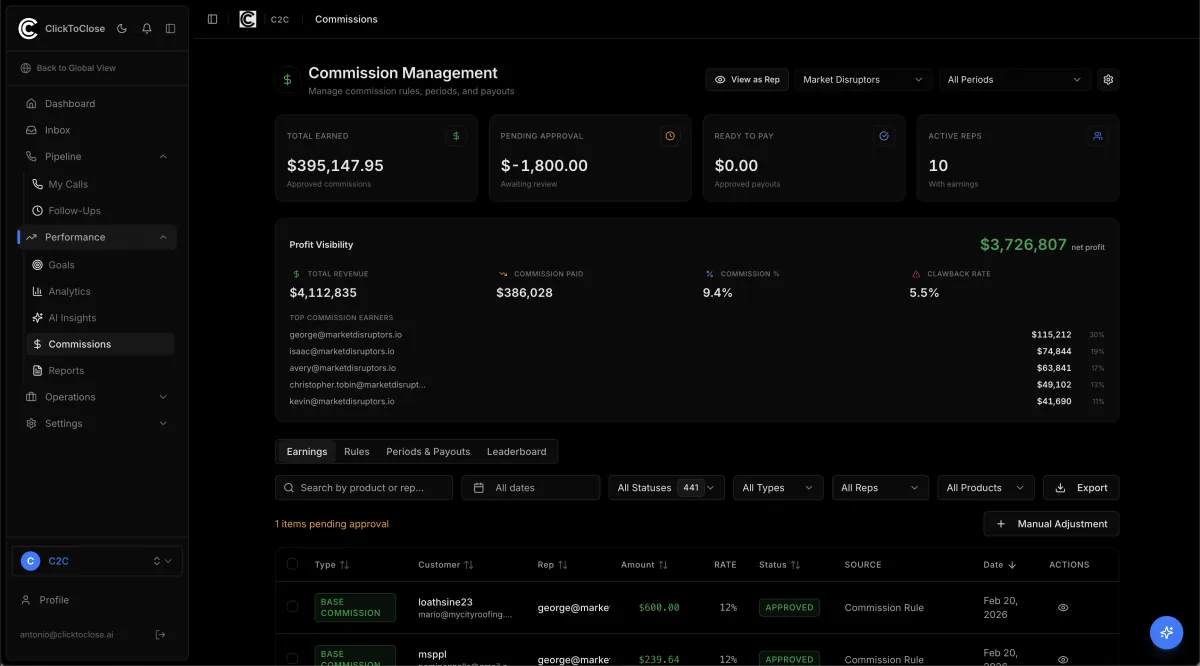
ClickToClose connects commission entries to the underlying sale, customer, rep, product, payment, and refund history. Admins can manage rules, approvals, adjustments, locked periods, payouts, and clawbacks from one auditable workflow.
Built for high-ticket sales organizations with closers, setters, overrides, payment plans, and refunds.
Updated 2026-08-13
Configurable rules
Support flat, tiered, product-specific, bonus, override, and manual commission entries.
Approval workflow
Review pending earnings and approve selected entries in bulk before payout.
Refund clawbacks
Connect refunded sales to the commission entries that must be reversed.
Periods and payouts
Lock completed periods, preserve the audit trail, export details, and prepare payout files.
How it works
- 1. A verified sale enters the commission engine.
- 2. The highest-priority matching rule calculates the earning.
- 3. An admin reviews exceptions and approves the period.
- 4. Refunds create traceable clawbacks instead of silent spreadsheet edits.
Frequently asked questions
Can ClickToClose handle setter and closer commissions?
Yes. Rules can account for different roles and attribution sources.
How are refunds handled?
Refunded sales can create linked clawbacks that remain visible in the earnings history.
Can commission periods be locked?
Yes. Locking a completed period protects the approved payout record from accidental changes.
Related sales operations systems
See how the reporting layer connects to the workflows and records that create the number.