Most contractors do not need another source of leads before they fix the leads they already buy. A missed call, slow reply, bad handoff, or forgotten estimate can waste demand that already cost money.
This AI lead follow-up for contractors map shows one way to connect the path from a new call to a booked and paid job. It uses 24 narrow agents across five departments. It also keeps a person in control of customer promises, consent, scheduling, and sales decisions.
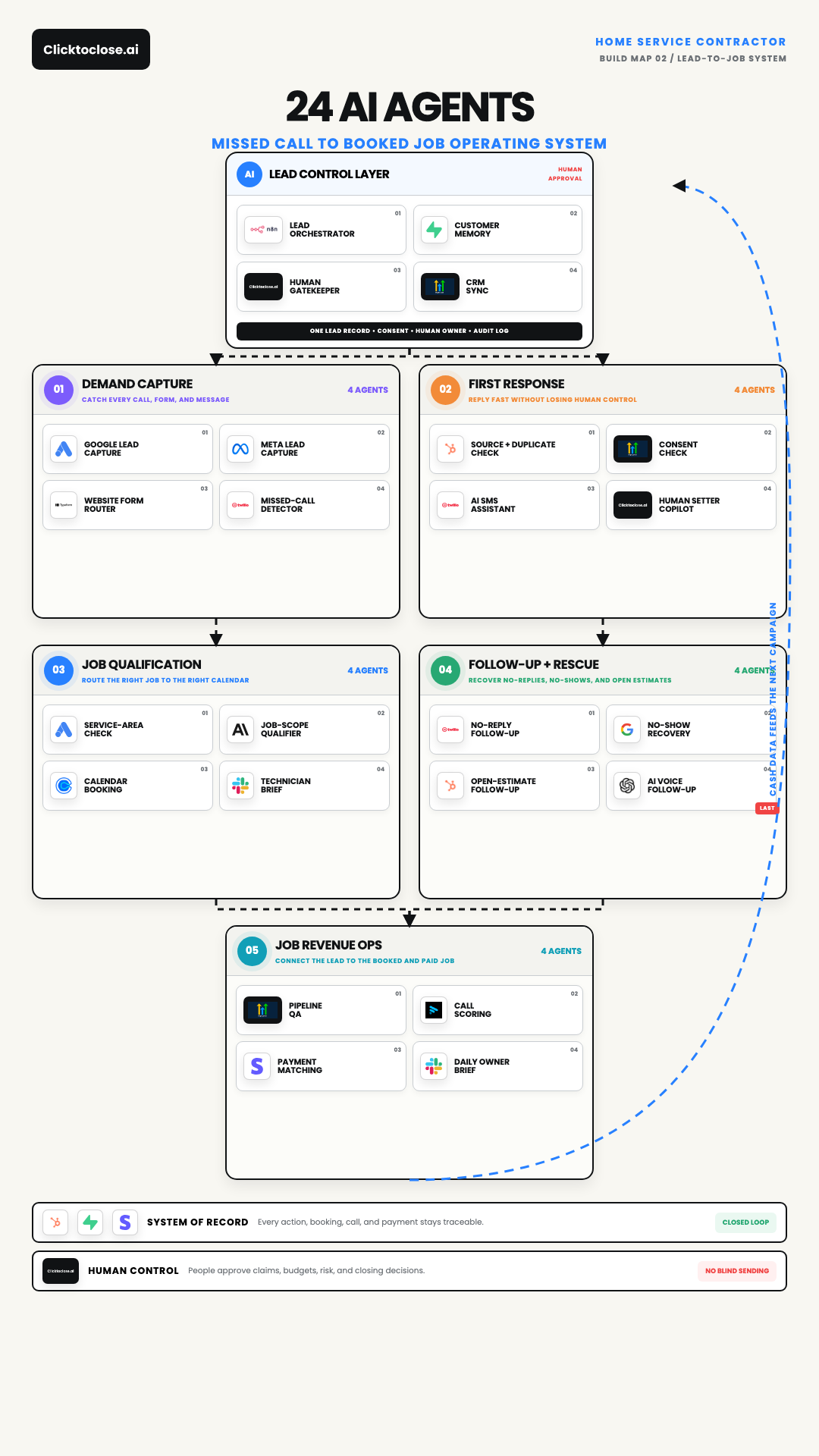
Open the full-resolution contractor lead-to-job map
What this contractor system is built to fix
A contractor lead can enter through Google, Meta, a website form, or a phone call. Each source stores different details. The buyer may also try two channels within a few minutes. If every entry creates a new record, the team can contact one person twice or assign two employees to the same lead.
The first goal is simple. Create one lead record, preserve the source, check consent, and assign one human owner.
The rest of the system supports that owner. It does not remove them. AI can classify the job, prepare a reply, build a brief, and flag a stalled estimate. A person still decides what to promise, when to contact the customer, and how to handle an exception.
The Google Ads lead form guide explains that lead forms can send data to a CRM through a webhook. That connection is useful only when the receiving system checks the record and proves that the handoff worked.
The four-agent lead control layer
The control layer sits above the five departments. It keeps the same rules in place as the lead moves.
Lead Orchestrator
The Lead Orchestrator decides which step should run next. It can route a missed call to the response team or move a qualified job to a calendar. It should also stop when required information is missing.
The orchestrator is not the salesperson. It does not invent a price, warranty, arrival time, or service promise.
Customer Memory
Customer Memory stores the facts that every department needs. That includes the contact details, source, service request, property, consent record, conversation, appointment, estimate, and payment status.
Keep stable IDs for the lead, contact, appointment, job, and payment. Names and phone numbers can change. A stable ID lets the team trace the same customer across systems.
Human Gatekeeper
The Human Gatekeeper creates approval tasks. A person should review unusual claims, customer complaints, high-value estimates, opt-out questions, and any message that falls outside the approved playbook.
This step also prevents two automated paths from contacting the same person at once.
CRM Sync
CRM Sync writes the approved status back to the main customer record. The CRM should remain the source for ownership and current opportunity stage. Other tools can help with messages and analysis, but they should not silently create a second version of the pipeline.
Department 1: Demand capture
Four agents watch the main entry points:
- Google Lead Capture
- Meta Lead Capture
- Website Form Router
- Missed-Call Detector
Each agent normalizes the input before routing it. A phone call may provide a number and timestamp. A form may provide an email, service type, and campaign data. The capture layer preserves both the original payload and the clean fields used by the CRM.
A missed call should create a visible event. It should not immediately start an unlimited message sequence. The event first needs a customer match, consent check, and owner.
Department 2: First response
The First Response department checks the record before anyone contacts the lead:
- Source and Duplicate Check
- Consent Check
- AI SMS Assistant
- Human Setter Copilot
The Source and Duplicate Check looks for an existing contact and active conversation. The Consent Check applies the approved channel rules. The AI SMS Assistant can draft or send approved messages within those rules. The Human Setter Copilot gives the owner the context and next action.
Opt-outs must stop future messages covered by the request. Twilio documents how its Advanced Opt-Out feature identifies opt-in, opt-out, and help keywords. The automation should store the resulting status and avoid sending a duplicate confirmation when the provider already handled it.
Fast response matters, but safe ownership matters too. A one-minute reply is not helpful if the lead receives two messages from two different numbers.
Department 3: Job qualification
The qualification department protects the calendar:
- Service-Area Check
- Job-Scope Qualifier
- Calendar Booking
- Technician Brief
The Service-Area Check compares the address or ZIP code with the actual service area. The Job-Scope Qualifier gathers only the facts needed to route the request. It should not diagnose work that requires a licensed professional or an on-site review.
Calendar Booking offers an approved slot for the right team. The Technician Brief summarizes the request, source, customer notes, and open questions. It should link back to the full record so the technician can verify the summary.
This stage needs an exception path. Emergency work, commercial jobs, warranty issues, and out-of-area requests may need a person before booking.
Department 4: Follow-up and rescue
Four agents work the common gaps:
- No-Reply Follow-Up
- No-Show Recovery
- Open-Estimate Follow-Up
- AI Voice Follow-Up
The human owner should remain visible across all four paths. AI SMS can assist with early follow-up. Email can carry estimate details. AI voice comes last for eligible leads who did not reply through the earlier paths.
Do not treat every old lead as open permission to contact. Use the current consent record and approved business rules. The Twilio Messaging Policy explains that senders need consent, sender identity, and a clear way to withdraw consent.
Each rescue path needs a stop rule. A reply, booking, sale, opt-out, complaint, or manual hold should remove the lead from the active sequence.
Department 5: Job Revenue Ops
Revenue Ops connects activity to the final business event:
- Pipeline QA
- Call Scoring
- Payment Matching
- Daily Owner Brief
Pipeline QA finds leads with no owner, no next action, or an invalid stage. Call Scoring flags recordings that deserve review. Payment Matching connects the paid job to the correct lead and campaign. The Daily Owner Brief lists the few items that need action now.
Do not label a booked appointment as revenue. Do not label an estimate as cash. Keep the lead, booking, completed job, invoice, payment, and refund as separate events.
The ClickToClose high-ticket sales analytics workspace follows the same record-level idea. The useful part is not one dashboard number. It is the path back to the source records and operating owner.
A practical build order
Do not install all 24 agents at once. Build the smallest complete path first.
- Choose one lead source and one service line.
- Define the lead, contact, appointment, job, and payment IDs.
- Preserve the source payload before cleaning it.
- Add the duplicate and consent checks.
- Assign one human owner and one next action.
- Add a no-send test path for every message step.
- Connect the qualified lead to the correct calendar.
- Verify the customer sees the right confirmation.
- Match the completed job and payment back to the lead.
- Add estimate rescue only after the first path works.
Test each step with a representative record. A webhook response or green automation run is not delivery proof. Check the CRM owner, visible message, appointment, job status, and payment match.
How to use the map
Print the map or open the full image. Pick one recent lead that should have become a job. Trace the lead across all five departments.
Mark the first point where the system cannot answer one of these questions:
- Where did the lead come from?
- Can this channel contact the lead?
- Who owns the next action?
- What should stop the sequence?
- Did the appointment happen?
- Was the job completed?
- Was the payment collected?
Fix that first break before adding another agent. A smaller workflow with clear ownership will beat a larger workflow with hidden gaps.
If you want the map, tools, and build order, comment CONTRACTOR on the reel and follow @antoniorevenue so the DM can reach you.
If you want help mapping this around your current CRM and lead sources, book a demo.